
Passoword Generator
You save ₹1,600.00
Password Generator (wordpress plugin)
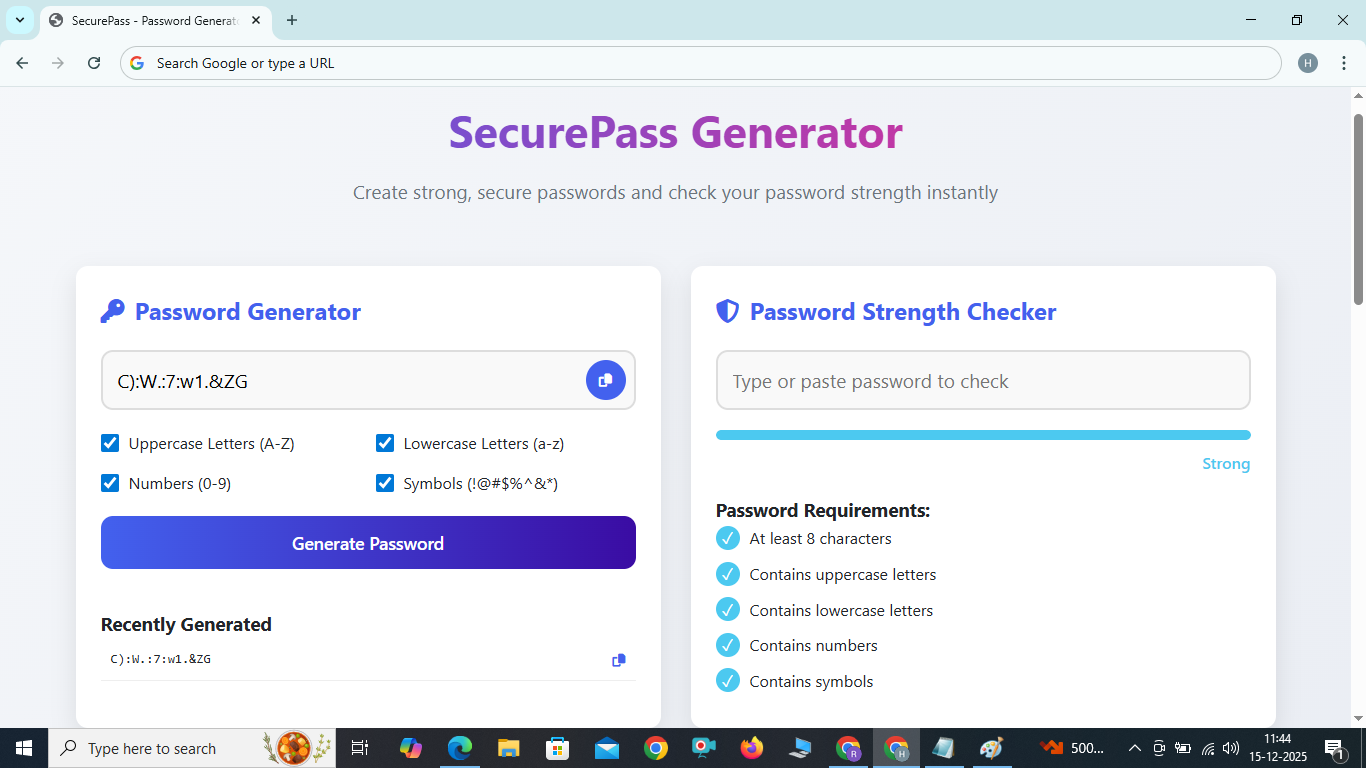
SecurePass Generator
Create strong, secure passwords and check your password strength instantly
SecurePass: Your Ultimate Password Solution
In today's digital world, strong passwords are your first line of defense against cyber threats. SecurePass provides a comprehensive solution for generating secure passwords and evaluating your existing passwords' strength.
Key Features
Strong Password Generation
Create highly secure passwords with customizable character sets
Instant Strength Assessment
Get immediate feedback on your password's security level
Mobile-Friendly Design
Use our tool seamlessly on any device
One-Click Copy
Easily copy generated passwords to your clipboard
How to Use SecurePass
- Generate a password: Select the character types you want to include (uppercase, lowercase, numbers, symbols) and click "Generate Password".
- Copy your password: Click the copy button to easily save your password to the clipboard.
- Check password strength: Type or paste any password into the strength checker to evaluate its security.
- Review requirements: The strength checker will show you which password requirements are met.
Frequently Asked Questions
Why do I need a strong password?
Strong passwords protect your accounts from brute-force attacks and unauthorized access. Weak passwords are easily guessable and can compromise your personal information.
How often should I change my passwords?
It's recommended to change critical passwords every 3-6 months. However, focus on creating strong, unique passwords for each account rather than frequently changing weak ones.
What makes a password strong?
A strong password is long (12+ characters), uses a mix of character types, avoids common words and patterns, and is unique for each account.
Should I use a password manager?
Yes, password managers can generate, store, and autofill strong passwords for all your accounts, making it easier to maintain good password hygiene.