
GLOBAL Clock
You save ₹1,400.00
GlobalClock Pro (wordpress plugin)
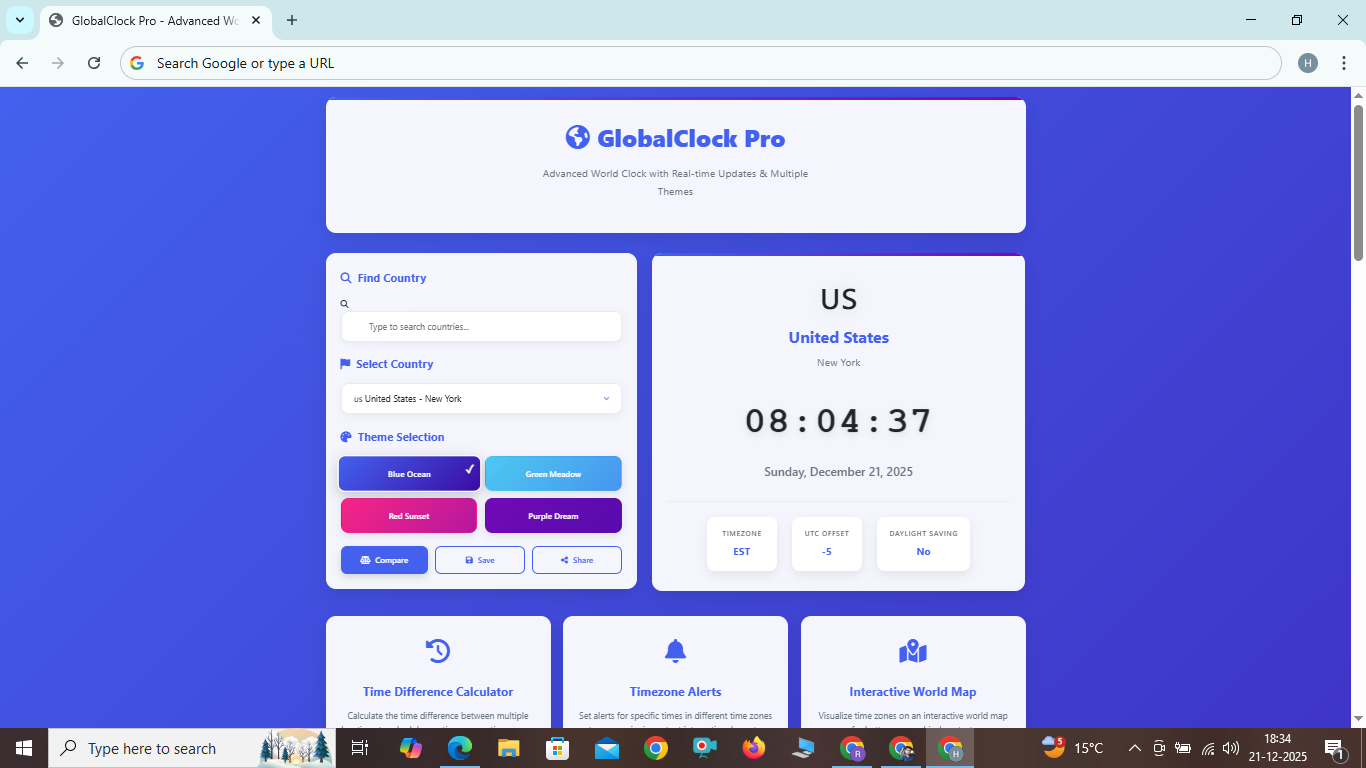
Advanced World Clock with Real-time Updates & Multiple Themes
Time Difference Calculator
Calculate the time difference between multiple locations to schedule meetings across time zones.
Timezone Alerts
Set alerts for specific times in different time zones to never miss important international events.
Interactive World Map
Visualize time zones on an interactive world map for better geographical context.
GlobalClock Pro: The Ultimate World Clock Solution
In today's interconnected world, managing time across different geographical locations has become essential for businesses, remote teams, travelers, and international families. GlobalClock Pro is a sophisticated world clock application designed to simplify global time management with precision, elegance, and powerful features.
Key Features of GlobalClock Pro
Global Coverage
Access accurate time information for over 200 countries and territories worldwide with precise timezone data and automatic daylight saving adjustments.
Real-time Updates
All clocks update in real-time with smooth animations, ensuring you always have the most current time information without manual refreshing.
Multiple Themes
Choose from four beautifully designed color themes to match your preferences, work environment, or reduce eye strain during extended use.
Smart Search
Quickly find countries and cities with our intelligent search functionality that filters results as you type, saving valuable time.
Fully Responsive
Perfectly optimized for all devices from desktop computers to smartphones and tablets, ensuring a seamless experience across platforms.
Country Flags
Visual country identification with flag emojis makes it easy to distinguish between different time zones at a glance.
Timezone Details
View comprehensive timezone information including UTC offsets, timezone abbreviations, and daylight saving status.
Share & Save
Save your favorite clock configurations and share them with colleagues or team members for coordinated scheduling.
How to Use GlobalClock Pro
Using GlobalClock Pro is simple and intuitive. Follow these steps to get started with managing global time zones effectively:
- Select a Country: Use the dropdown menu or search box to find and select a country. The clock will automatically update to show the current time in that location with beautiful animations.
- Choose a Theme: Select one of four carefully designed color themes (Blue Ocean, Green Meadow, Red Sunset, or Purple Dream) to customize the application's appearance to your liking.
- View Detailed Information: Examine the timezone details including UTC offset and daylight saving information to understand the complete time context.
- Utilize Additional Features: Explore the time difference calculator, set timezone alerts, and use the interactive world map for enhanced time management.
- Save and Share: Save your preferred configurations for quick access and share them with team members for coordinated scheduling across time zones.
- Compare Timezones: Use the compare feature to see time differences between multiple locations simultaneously for efficient meeting planning.
Benefits of Using GlobalClock Pro
GlobalClock Pro offers numerous advantages for professionals, teams, travelers, and anyone working across different time zones:
- Improved Scheduling Efficiency: Avoid scheduling meetings at inconvenient times by quickly checking the local time in other locations, reducing coordination overhead.
- Enhanced Productivity: Plan your workday more effectively by understanding when colleagues in other time zones are available, optimizing collaboration windows.
- Reduced Communication Errors: Eliminate timezone calculation mistakes that can lead to missed meetings, deadlines, or important international events.
- Better Team Coordination: Coordinate more effectively with international team members by respecting their local working hours and cultural norms.
- Streamlined Travel Planning: Prepare for international travel by understanding the local time at your destination before you arrive, reducing jet lag impact.
- Increased Global Awareness: Develop a better understanding of global time differences and how they impact international business, communication, and relationships.
- Professional Appearance: Present a professional image when scheduling international meetings by demonstrating awareness of time zone differences.
Frequently Asked Questions
How accurate is the time information in GlobalClock Pro?
GlobalClock Pro uses highly accurate timezone data and accounts for daylight saving time changes automatically. The application synchronizes time regularly to ensure precision. In the rare event that our primary time source is unavailable, the application falls back to robust browser-based time calculations to ensure continuous operation without interruption.
Can I use GlobalClock Pro on my mobile device?
Absolutely! GlobalClock Pro is fully responsive and works perfectly on smartphones and tablets. The interface adapts seamlessly to any screen size, ensuring a great experience across all devices. You can even add it to your home screen for quick access like a native mobile application.
Does GlobalClock Pro work offline?
While GlobalClock Pro works best with an internet connection for the most accurate and up-to-date information, it can function offline using cached timezone data and sophisticated browser-based time calculations. This ensures you can still access critical time information even when connectivity is limited.
How many countries are supported in GlobalClock Pro?
GlobalClock Pro supports all recognized countries and territories worldwide, with accurate timezone information for each location. Our database is regularly updated to reflect any changes in timezone policies, daylight saving schedules, or geopolitical changes that might affect timekeeping.
Is my data stored when I use GlobalClock Pro?
GlobalClock Pro respects your privacy. The application stores your clock configurations locally in your browser. We don't collect or store any of your personal data on external servers, ensuring complete privacy and security. Your settings remain on your device and are never shared with any third parties.