
FOCUS FLOW Advance Timer / Time Management

You save ₹1,200.00
FocusFlow Pro (wordPress Plugin ):
The Ultimate Pomodoro Technique Timer for Enhanced Productivity
FocusFlow Pro is a sophisticated Pomodoro timer application designed to help you maximize productivity through scientifically proven time management techniques. By breaking work into focused intervals separated by short breaks, FocusFlow Pro helps maintain high levels of concentration while preventing burnout.
Advanced Features of FocusFlow Pro
Customizable Intervals
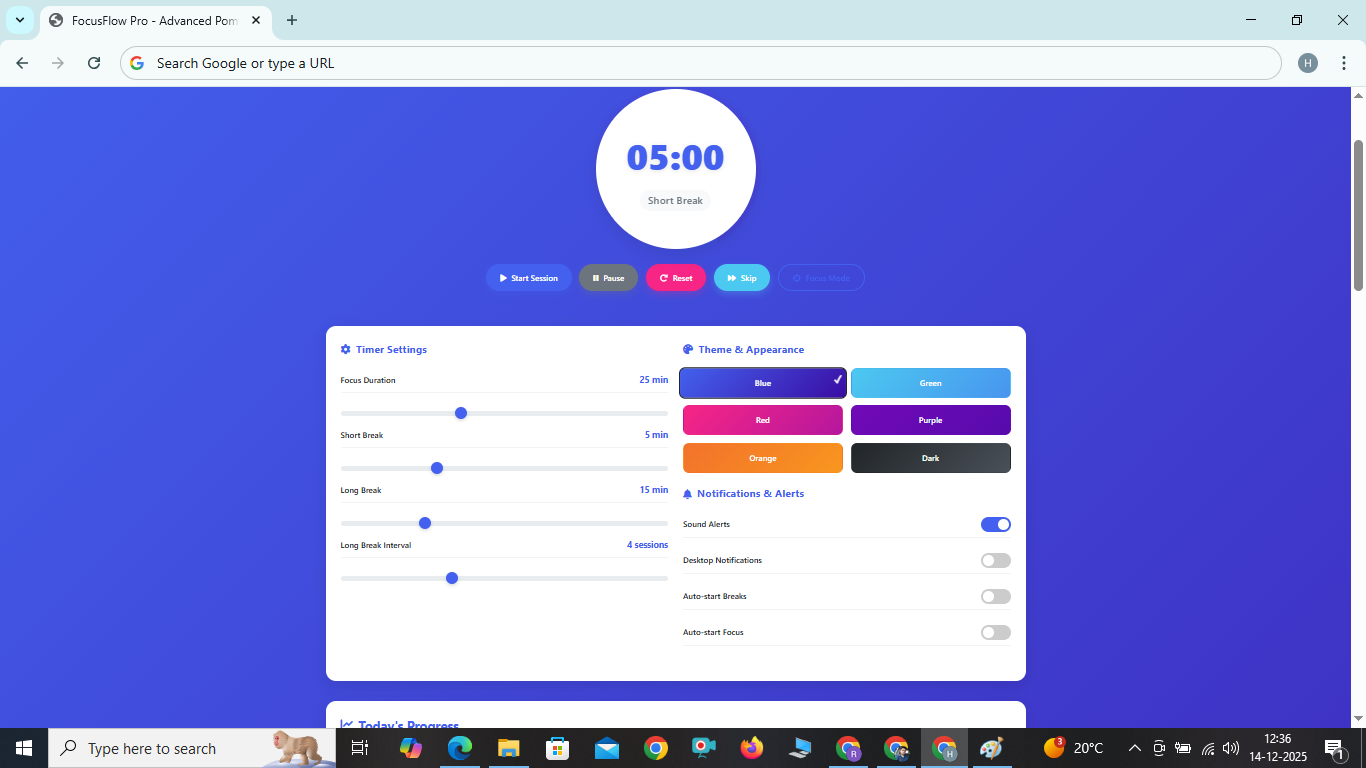
Adjust focus sessions, short breaks, and long breaks to match your personal productivity rhythm and task requirements. Set custom long break intervals for optimal recovery.
Six Beautiful Themes
Choose from six visually appealing color themes including dark mode to create a personalized working environment that suits your preferences and reduces eye strain.
Integrated Task Management
Manage your to-do list directly within the app and track Pomodoro sessions for each task. Stay organized and focused on your priorities.
Detailed Progress Analytics
Monitor your productivity with detailed statistics including sessions completed, focus time, break time, and productivity scores to understand your work patterns.
Smart Notifications
Receive visual and audible alerts when sessions complete, with options for desktop notifications and auto-starting breaks or focus periods.
Focus Mode
Minimize distractions with focus mode that dims everything except the timer, helping you maintain deep concentration during work sessions.
Fullscreen Mode
Enter fullscreen mode for an immersive experience free from browser distractions, perfect for dedicated work sessions.
Fully Responsive Design
Enjoy a seamless experience across all devices, from desktop computers to smartphones and tablets, with an interface that adapts perfectly to any screen size.
How to Use FocusFlow Pro for Maximum Productivity
Using FocusFlow Pro is simple and intuitive. Follow these steps to boost your productivity:
- Set Your Preferences: Adjust the timer durations in the settings panel to match your workflow. Experiment with different session lengths to find what works best for you.
- Choose a Theme: Select one of six color themes to create your ideal working environment. Dark mode is perfect for low-light conditions.
- Add Your Tasks: Use the task management section to list your priorities for the day. You can track Pomodoro sessions for each task.
- Start Your Session: Click the Start button to begin your first focus session. Use focus mode for deep work sessions.
- Take Regular Breaks: When the timer completes, take a short break (5 minutes) or a long break (15 minutes) after several sessions.
- Track Your Progress: Monitor your productivity statistics to understand your work patterns and improve over time.
- Stay Consistent: Use FocusFlow Pro regularly to build productive habits and maintain focus throughout your workday.
Benefits of the Pomodoro Technique
The Pomodoro Technique, implemented perfectly in FocusFlow Pro, offers numerous advantages for professionals, students, and anyone looking to improve their focus and productivity:
- Enhanced Focus: By working in timed intervals, you train your brain to focus intensely on one task at a time, reducing context switching.
- Reduced Burnout: Regular breaks prevent mental fatigue and maintain consistent performance throughout the day, preventing afternoon slumps.
- Better Time Management: The technique helps you understand how long tasks actually take, improving planning and estimation skills over time.
- Increased Motivation: The satisfaction of completing sessions creates a positive reinforcement loop that boosts motivation and makes daunting tasks more manageable.
- Minimized Distractions: Knowing you have a break coming soon makes it easier to resist interruptions and stay on task, improving overall focus.
- Improved Work-Life Balance: Structured work periods with dedicated breaks help maintain boundaries between work and personal time, reducing overtime and stress.
- Enhanced Task Estimation: Over time, you'll develop a better sense of how many Pomodoros different types of tasks require, improving project planning.
Frequently Asked Questions
What is the ideal Pomodoro session length?
The traditional Pomodoro technique uses 25-minute focus sessions, but research shows that optimal session length varies by individual and task type. FocusFlow Pro allows you to customize session length from 5 to 60 minutes to find what works best for you. Many users find 25-30 minutes ideal for most tasks, while complex problems might benefit from longer 45-50 minute sessions.
How many Pomodoro sessions should I complete in a day?
Most productivity experts recommend 8-12 Pomodoro sessions per day for knowledge workers. However, this can vary based on your energy levels, task difficulty, and personal preferences. FocusFlow Pro helps you track your sessions to find your optimal daily target. Remember that quality matters more than quantity - it's better to have 6 highly productive sessions than 12 distracted ones.
Can I use FocusFlow Pro on my mobile device?
Absolutely! FocusFlow Pro is fully responsive and works perfectly on smartphones and tablets. The interface adapts seamlessly to any screen size, ensuring a great experience across all devices. You can even add it to your home screen for quick access like a native app.
Is my data stored when I use FocusFlow Pro?
FocusFlow Pro runs entirely in your browser and stores your settings, statistics, and tasks locally. We don't collect or store any of your personal data on external servers, ensuring complete privacy. Your data remains on your device and is not shared with any third parties.
Can I change the timer sounds?
Currently, FocusFlow Pro uses browser-based notification sounds. Future updates may include custom sound options. The notification toggle allows you to enable or disable sound alerts based on your preference. You can also enable desktop notifications for a more prominent alert system.