
Excel File Merger Software , Merge Excel
You save ₹2,000.00
Merge Excel Online (wordpress plugin)
- Free Unlimited Size Files
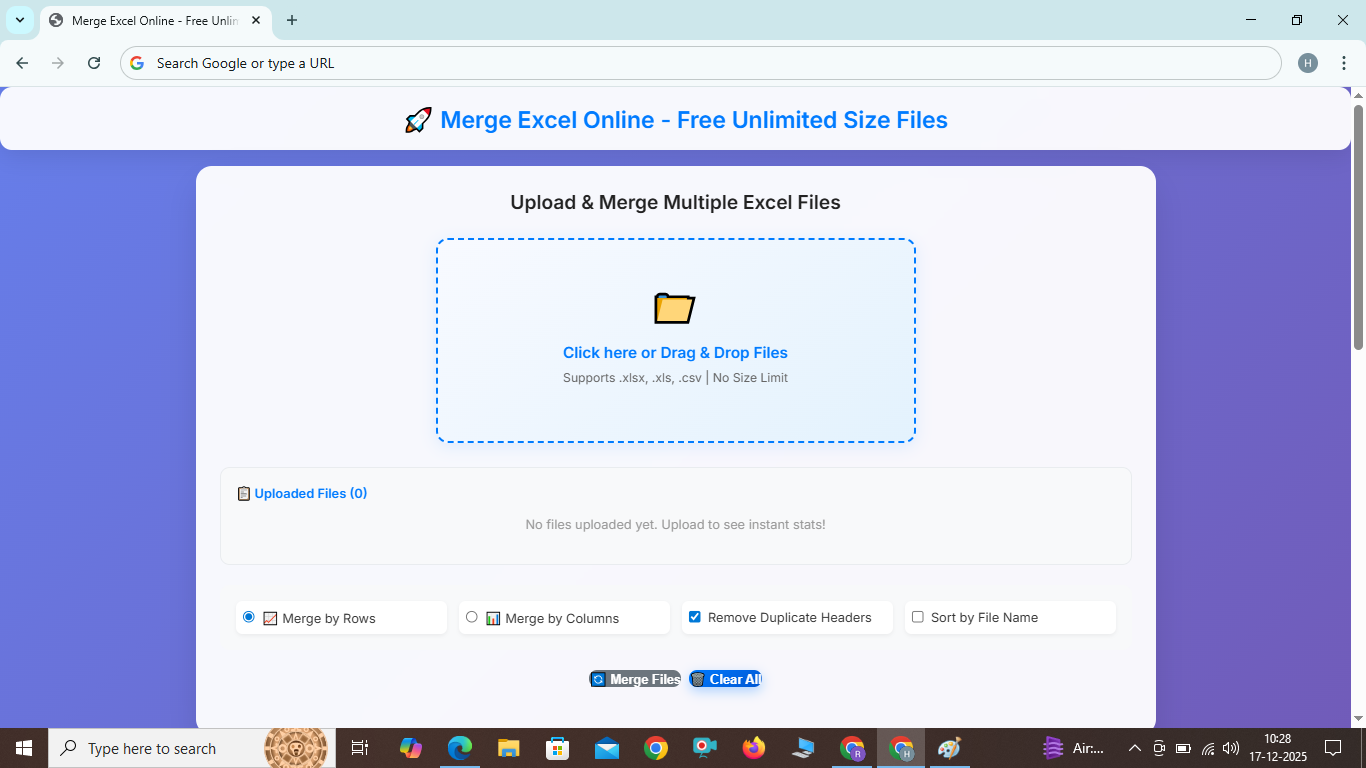
Upload & Merge Multiple Excel Files
Key Features of Merge Excel Online
Merge Excel Online is designed with user convenience in mind. Here are the standout features that make it the go-to tool for merging Excel files:
- Smart Row Merging: When merging by rows, if files have the same number of columns, it maintains the structure. If columns differ, it preserves each file's column count (e.g., File 1: 4 columns for 20 rows, File 2: 5 columns for 20 rows → Result: Rows 1-20 with 4 cols, Rows 21-40 with 5 cols)
- Unlimited File Size Support: Unlike many online tools that limit file sizes, Merge Excel Online handles files of any size, from small spreadsheets to gigabyte-sized datasets.
- Multiple Merge Options: Choose to merge by rows or columns.
- Remove Duplicate Headers: Automatically eliminate redundant headers.
- Sort by File Name: Organize files alphabetically before merging.
- Instant File Statistics: View rows, columns, and file size instantly.
- Mobile Responsive: Perfect viewing on all devices with no overflow.
Merge Excel Online: The Ultimate Guide to Combining Excel Files Effortlessly
In today's data-driven world, managing multiple Excel files can be a daunting task. Whether you're a business analyst consolidating reports, a student compiling research data, or a professional handling large datasets, the need to merge Excel files arises frequently. This is where tools like Merge Excel Online come into play. Our free online tool allows you to merge Excel files seamlessly, supporting unlimited file sizes and various formats like XLSX, XLS, and CSV. In this comprehensive guide, we'll explore everything you need to know about merging Excel files online, including features, step-by-step instructions, and frequently asked questions.
Key Features of Merge Excel Online
Merge Excel Online is designed with user convenience in mind. Here are the standout features that make it the go-to tool for merging Excel files:
- Smart Row Merging: When merging by rows, if files have the same number of columns, it maintains the structure. If columns differ, it preserves each file's column count (e.g., File 1: 4 columns for 20 rows, File 2: 5 columns for 20 rows → Result: Rows 1-20 with 4 cols, Rows 21-40 with 5 cols)
- Unlimited File Size Support: Unlike many online tools that limit file sizes, Merge Excel Online handles files of any size, from small spreadsheets to gigabyte-sized datasets.
- Multiple Merge Options: Choose to merge by rows or columns.
- Remove Duplicate Headers: Automatically eliminate redundant headers.
- Sort by File Name: Organize files alphabetically before merging.
- Instant File Statistics: View rows, columns, and file size instantly.
- Mobile Responsive: Perfect viewing on all devices with no overflow.
FAQ: Frequently Asked Questions About Merge Excel Online
What file formats does Merge Excel Online support?
It supports XLSX, XLS, and CSV files, allowing you to merge different formats seamlessly.
Is there a limit on file size or number of files?
No, there's no limit. You can merge Excel files of any size or quantity.
Does the tool store my data?
No, all processing is done client-side in your browser. Your data remains private.