

Add Page Number On Pdf software
You save ₹1,000.00
Advanced PDF Page Number Adder (wordpress plugin)
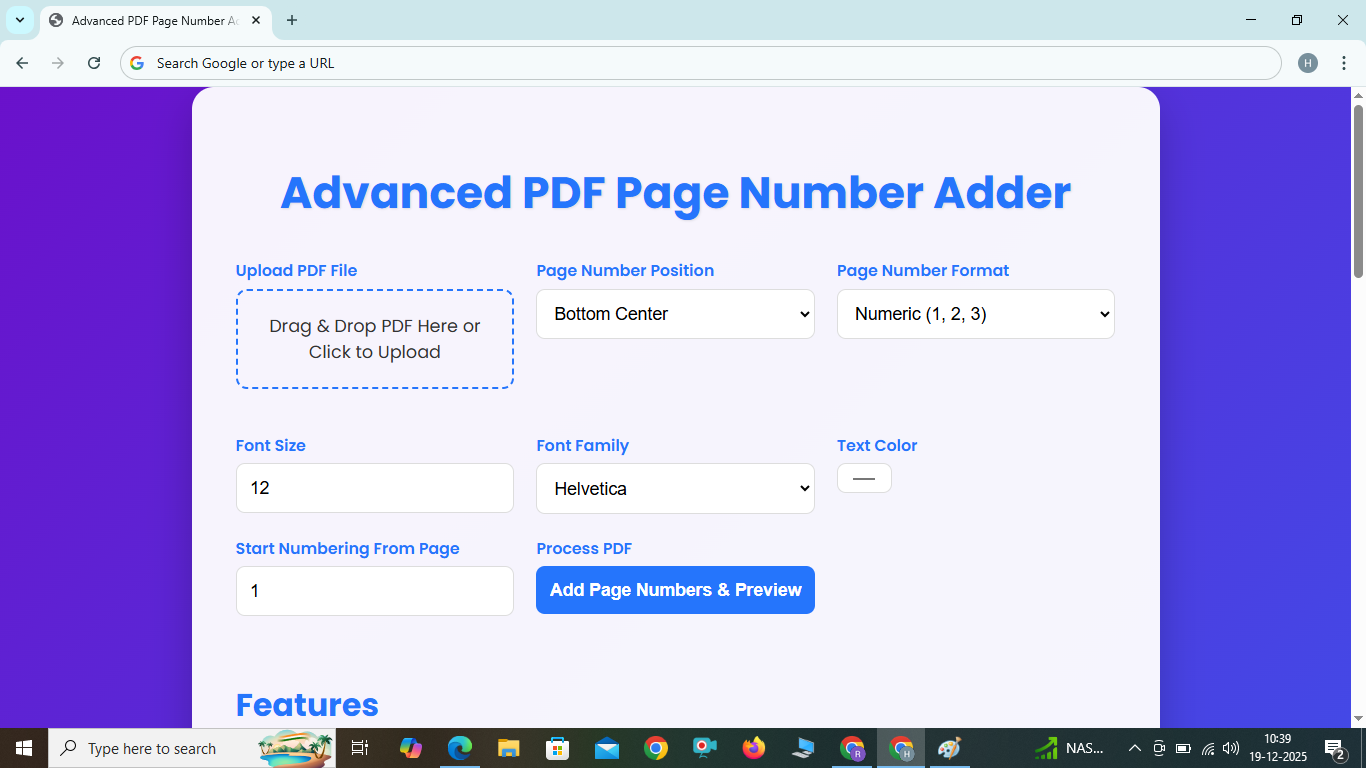
Our advanced PDF page number adder offers unique capabilities for both professionals and casual users. Key features include:
- Multiple Numbering Formats: Choose from numeric (1, 2, 3), Roman lowercase (i, ii, iii), Roman uppercase (I, II, III), or alphabet lowercase (a, b, c), plus custom formats like "Page %p of %t".
- Flexible Positioning: Place page numbers at top-left, top-center, top-right, bottom-left, bottom-center, or bottom-right without quality loss.
- Font and Color Customization: Select from standard fonts (Helvetica, Courier, Times Roman), adjust sizes, and pick colors to match your document's style.
- Live Preview and Drag-and-Drop: Preview the first page after adding numbers, with easy drag-and-drop file upload.
- Start Numbering from Any Page: Perfect for appendices or multi-part documents, begin numbering from a specific page.
How to Use
Follow these simple steps to add page numbers to your PDF:
- Drag and drop your PDF into the upload area or click to select it.
- Choose the page number position from the dropdown.
- Select a numbering format (e.g., 1, 2, 3 or i, ii, iii) or enter a custom format if needed.
- Customize font size, font family, color, and starting page.
- Click "Add Page Numbers & Preview" to process and preview the first page.
- Download the updated PDF by clicking "Download Numbered PDF".
No software installation needed – all processing is done in your browser while preserving quality.
Benefits
Our tool provides numerous advantages for adding page numbers to PDFs:
- Preserves Quality: Vector-based additions ensure no loss in resolution or clarity.
- Time-Efficient: Fast processing with advanced options saves time compared to manual editing.
- Professional Output: Create polished documents for reports, books, or legal files with custom styling.
- Fully Responsive: Works seamlessly on phones, tablets, and desktops with no layout issues.
- Secure and Free: Local processing in your browser ensures privacy without server uploads.
FAQ
Answers to common questions about our PDF page number adder:
Does this tool affect PDF quality?
No, it uses non-destructive methods to maintain sharpness and quality.
What do the page number formats mean?
Choose from numeric (1, 2, 3), Roman lowercase (i, ii, iii), Roman uppercase (I, II, III), alphabet lowercase (a, b, c), or create a custom format using %p (page number) and %t (total pages).
Can I use custom fonts?
Currently, standard PDF fonts are supported for compatibility. Custom font support is planned for future updates.
Is there a file size limit?
The tool efficiently handles files up to 100MB; larger files may take longer based on your device.
Is this tool mobile-compatible?
Yes, it's 100% responsive, fitting perfectly on mobile screens without overflow.